
Plan it.
Be there.
 Field notes · iPhone & iPad
SkyAura
Plan the shot, then read the sky. Aurora, sunrise, sunset, tides and mountain weather, and a planner that puts the sun or moon exactly where you want it.
SkyAura Guide & introduction
A walk through the app by Dave Schmidt.

Admit one · Beta
You're invited: join SkyAura beta.
Scan with your iPhone camera, or tap here, to install the test build through Apple's TestFlight and try new features before they're released.
Join on TestFlight ↗The Sky Map is seven layers deep
Everything you see on the map is stacked in a fixed order, so each layer answers one question. Hover the stack to pull it apart. Each layer except the base map has its own button on the right of the screen.
- Panels & controlsKp, your chance of aurora, place name, nearby peaks, the time scrubber and the layer buttons.
- Pin & direction linesYour forecast spot, with bearings to sunrise, sunset, moonrise, moonset and the Milky Way core.
- AuroraNOAA's live OVATION nowcast for the next hour, then an oval modelled from the Kp forecast. Yellow → red with strength.
- CloudsMET Norway cloud cover for the hour on the scrubber. Gaps in the veil are where the sky is clear.
- DaylightShades wherever the sun is above −12°, too bright for aurora.
- Dark skiesSky glow modelled from NASA's Black Marble night-lights image. Clear is darkest; blue → green → yellow → red → white is brighter. Its own opacity slider.
- Base mapChoose from four with the top button on the right: Dark (turns cyan by day), Satellite aerial photos, Topo with contours, paths and spot heights, or Today, NASA's latest daily satellite picture of the real clouds and snow. All turn deep red in night vision.
Tonight's sky, wherever you pin
 1
2
3
4
5
6
7
8
9
1
2
3
4
5
6
7
8
9
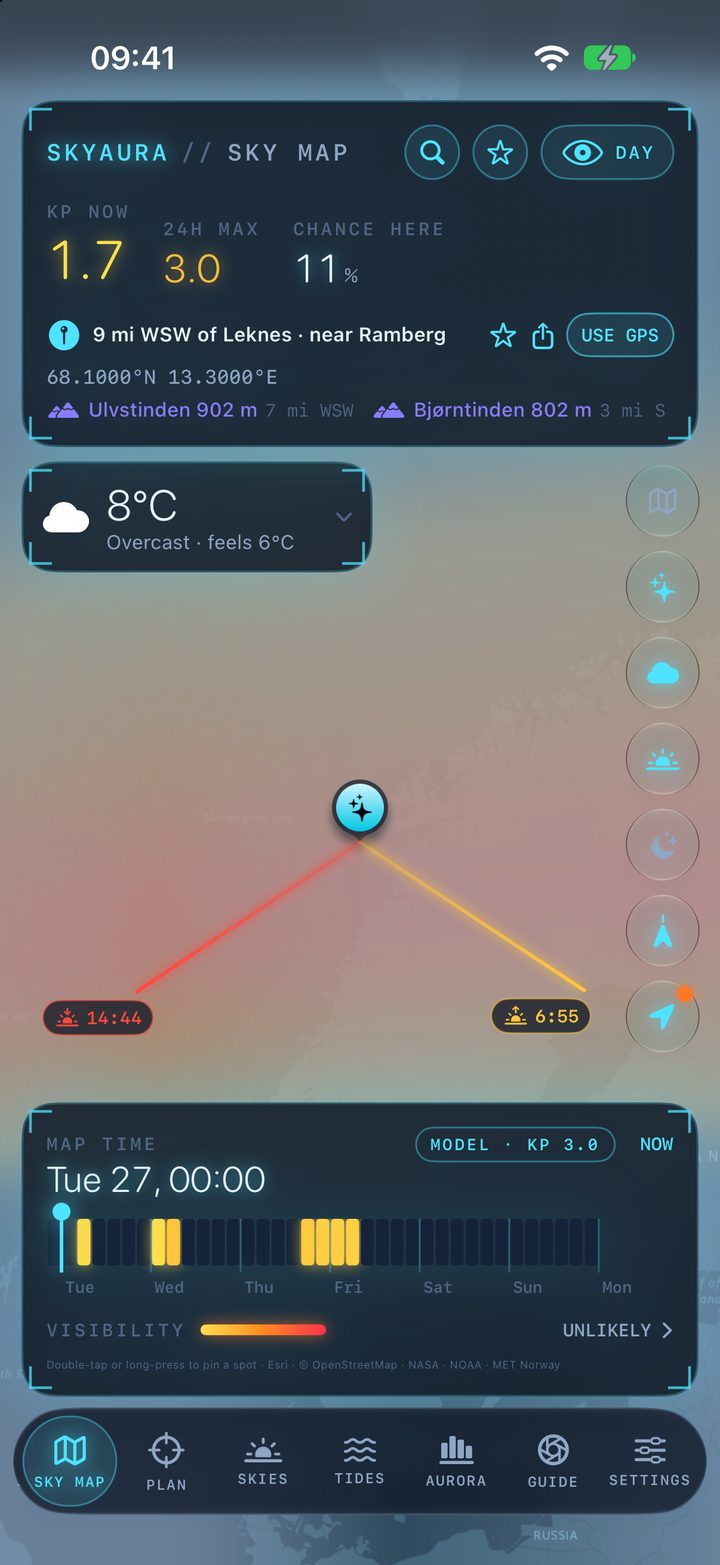
- 1Kp now, 24h max, chance here
Geomagnetic activity right now, the peak expected in the next day, and NOAA's percentage for aurora above your spot.
- 2Search, saved spots, Day/Night
Search a town, a summit or coordinates. ☆ opens your saved spots and their alerts. Day/Night flips the whole app to red.
- 3Pinned place
Nearest town, coordinates, and the highest named peaks nearby with their distance and direction. ☆ saves the spot; the share button sends a plan; USE GPS goes back to where you are.
- 4Weather card
Folded to the temperature. Tap to open: wind, cloud, and flags for gusts, lens fog, frost, ice, snow and dawn mist. Drag it anywhere; double-tap to hide, double-tap the pin to bring it back.
- 5Layer buttons
Base map, then aurora, clouds, daylight, dark skies, direction lines, and locate. Double-tap locate to drop the pin and go back to GPS.
- 6Pin and direction lines
Drag the pin to move it. Lines show where the sun, the moon and the Milky Way core rise and set, with the times, for the day on the scrubber.
- 7Map time
Drag along the week. Each 4-hour block is coloured by your chance of seeing aurora; the whole map moves through time with you.
- 8Verdict
Unlikely, possible, good or strong for the hour you're looking at. Tap it to open the Aurora tab.
- 9Tabs
Sky Map, Plan, Skies, Tides, Aurora, Guide, Settings. A rail down the left side on iPad and in landscape.
Put the moon behind the lighthouse
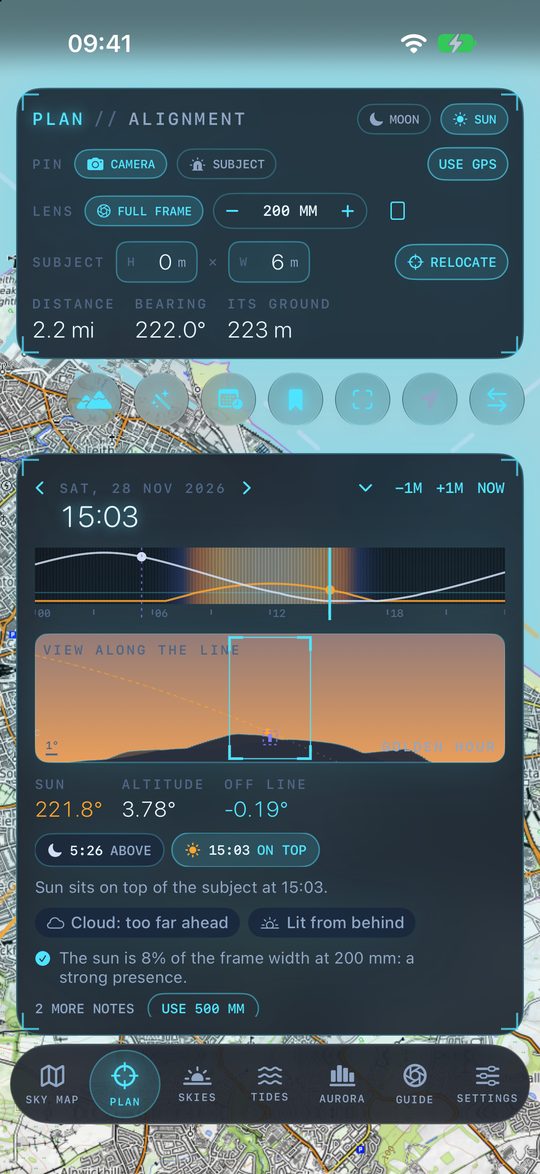
Pin where you'll stand and what you want in the shot. SkyAura works out when the sun or moon lines up with it, how big it will look with your lens, and whether the hills are in the way. Start by long-pressing the map on your subject, then long-press where you'll stand.
 1
2
3
4
5
6
7
8
9
10
11
1
2
3
4
5
6
7
8
9
10
11
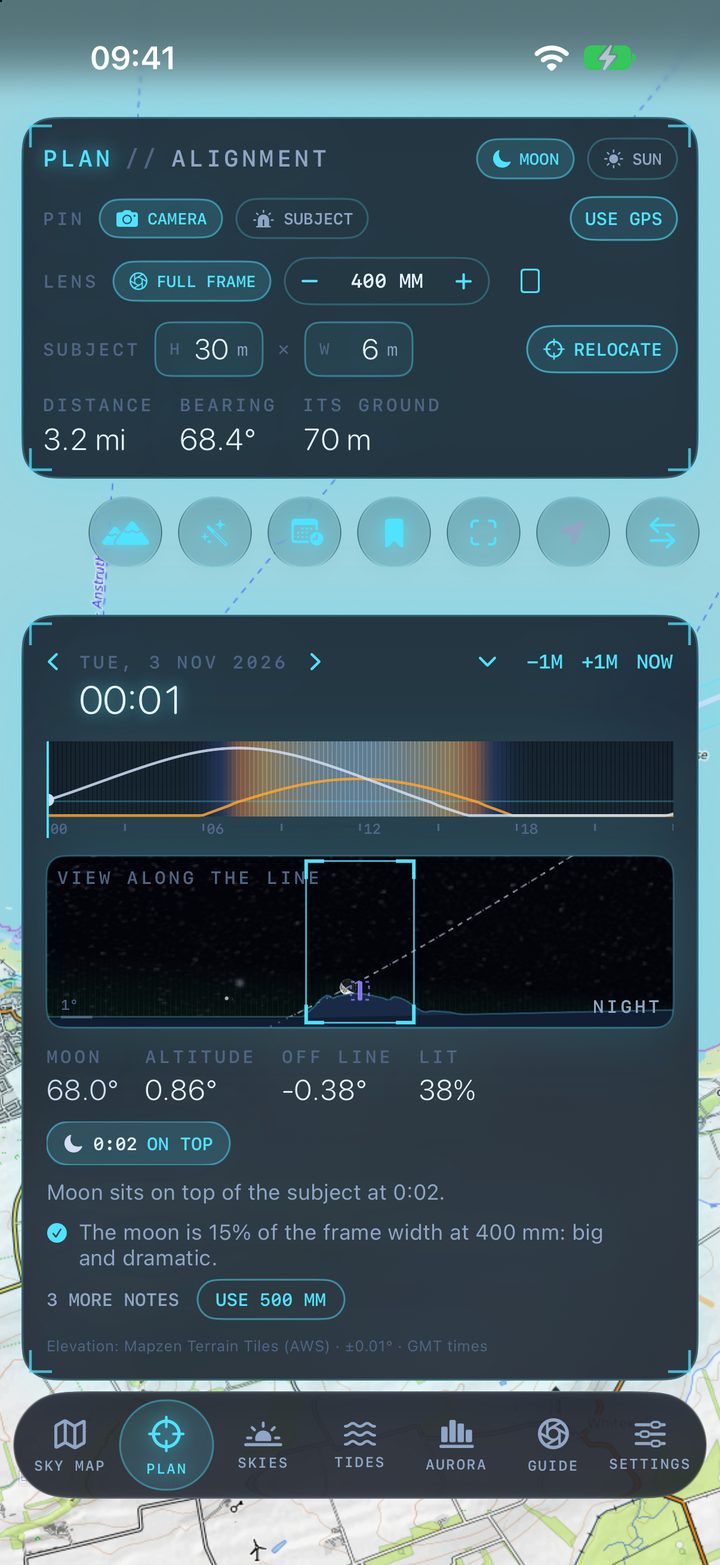
- 1Moon or sun
Choose what you want lined up with the subject.
- 2Camera and subject pins
Pick which pin to place, then long-press the map. USE GPS puts the camera where you're standing.
- 3Your lens
Tap the sensor to change it (full frame, APS-C, Micro 4/3, 1-inch, medium format or phone), use − and + for focal lengths from 14 to 1200 mm, and the last button turns the frame portrait.
- 4Subject size
Height × width of a lighthouse, tree or tower. With terrain loaded, the height is measured from the subject's own ground.
- 5Relocate
Moves the camera along the line so the sun or moon sits right on the subject's top, on the day you're planning. UNDO puts it back.
- 6Distance, bearing, its ground
How far the subject is, which way you face, and the height of the ground it stands on.
- 7Map buttons
Base map, Tools, Find next, Saved plans, show both pins, camera at my location, and swap camera and subject.
- 8The day
Sun and moon heights through the day, with golden hour and night shaded. Drag to scrub; the arrows and ±1M step the date and the minute; NOW jumps back.
- 9View along the line
What the camera sees: the real skyline from terrain data, the sun or moon at true size, the Milky Way and aurora, and your frame. Drag to aim the frame; double-tap for full screen.
- 10Readout and alignments
Where the sun or moon is, how far it is off the line, and how lit. Each chip is an alignment that day: tap it to jump there.
- 11Notes
Plain-language advice: how big it looks, whether it all fits, how long the moment lasts. USE 500 MM switches to the suggested lens.
The map shows where the shot works
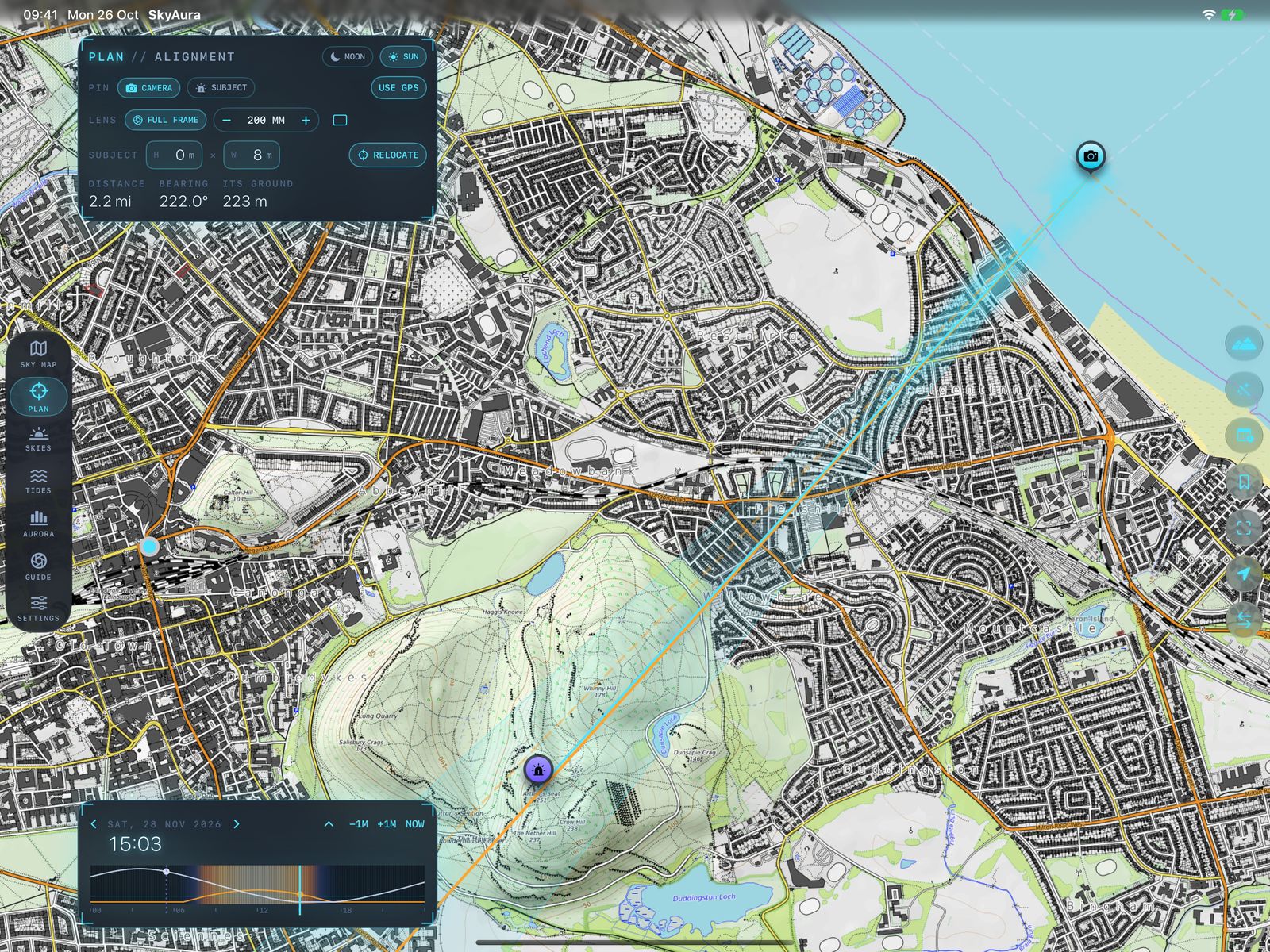
With terrain loaded, the map is shaded along the line through the subject. A Stand here pin marks the closest clear spot for the time you've chosen; tap it, then Move camera here. The pin hides when you're already there.
 1
2
3
4
5
1
2
3
4
5
- 1Plan panel
Pins, lens, subject size and Relocate.
- 2Camera
Portobello beach.
- 3Subject
Arthur's Seat, 251 m.
- 4Shaded line
Where the sun sets on the summit at 15:03.
- 5The day, folded
Double-tap the panel to fold it down for more map.
Compose it before you leave home
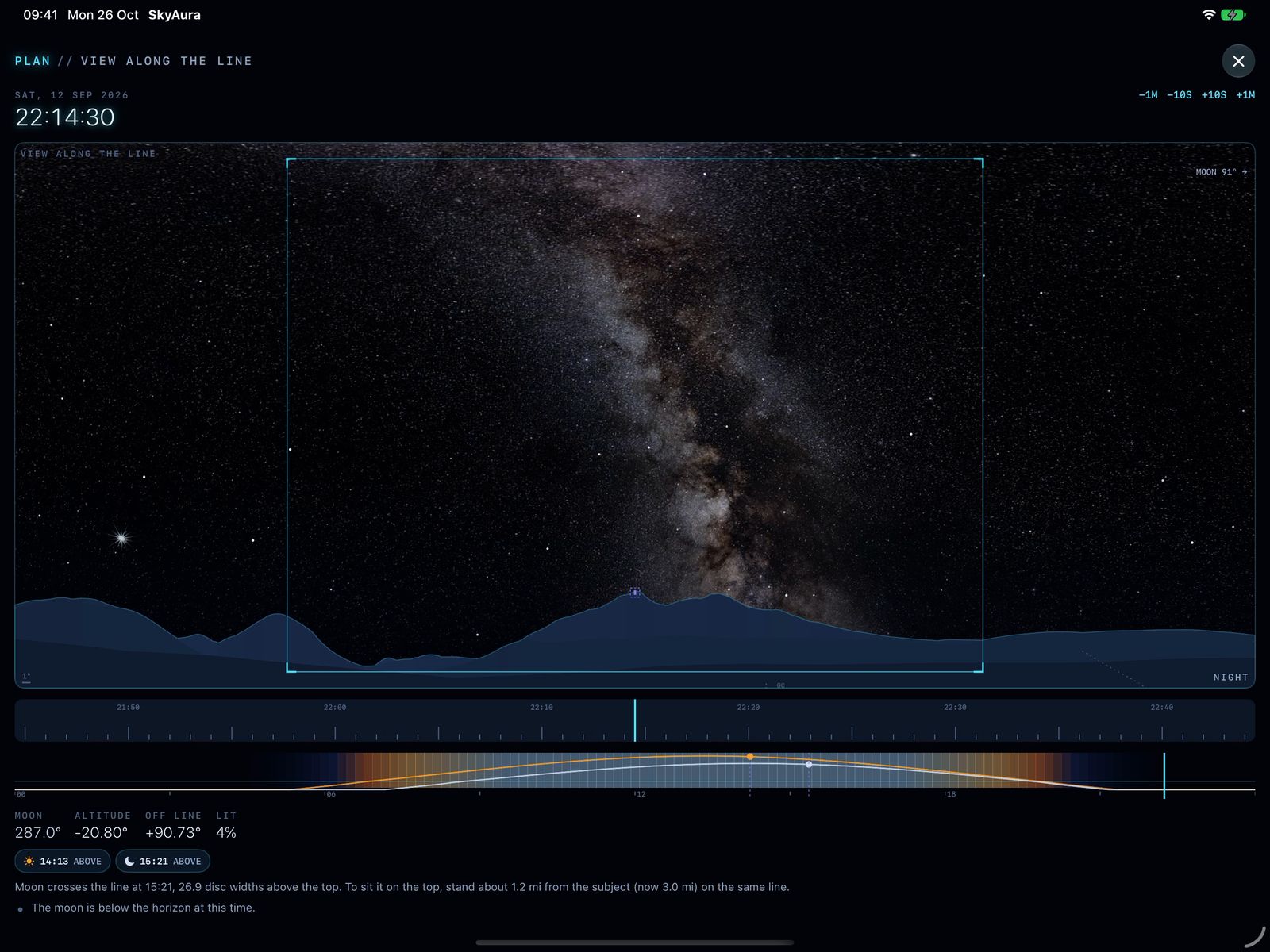
Double-tap the view along the line to fill the screen. The stars, the Milky Way (a real photograph, turning with the sky) and the aurora are drawn where they'll be at that minute, over the real skyline.
 1
2
3
4
5
6
1
2
3
4
5
6
- 1Your frame
The lens's view. Drag to tilt and pan it.
- 2Milky Way
ESO's all-sky photo, placed star for star.
- 3Skyline
Hills out to 45 km, from elevation data.
- 4Fine time
Scrub in 5-second steps.
- 5The day
Twilight and night bands, sun and moon.
- 6Close
Or double-tap again.
Answers, not jargon
From the buttons on the Plan map. Tools also has a sky camera: hold the phone up and see the sun, moon and Milky Way paths drawn over the real view.
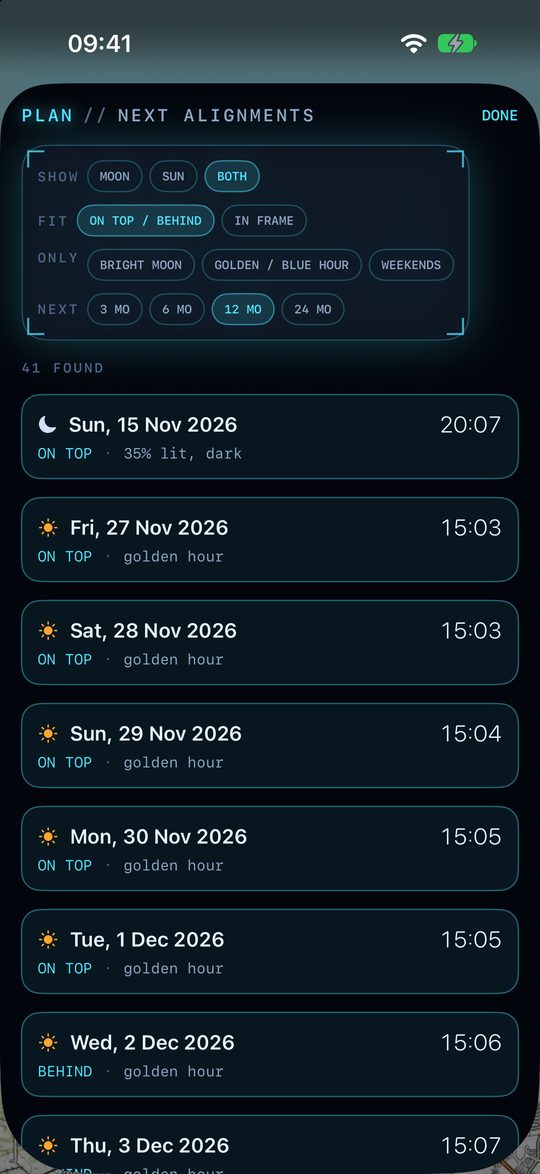
Every alignment for a year. Filter for a bright moon, golden hour or weekends, then tap one to jump there.
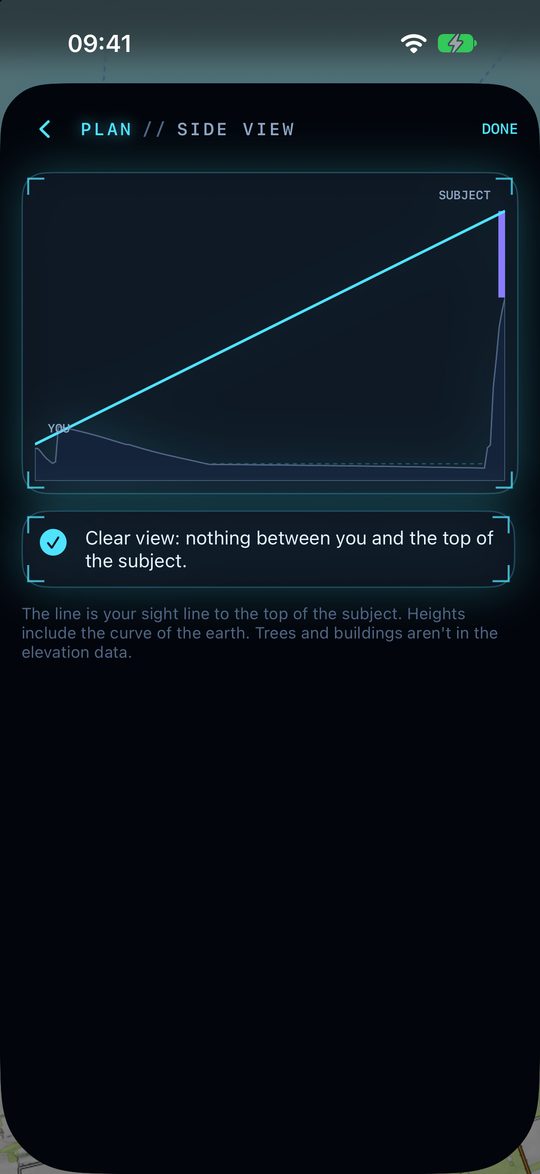
The ground between you and the subject, your sight line, and whether a ridge gets in the way.
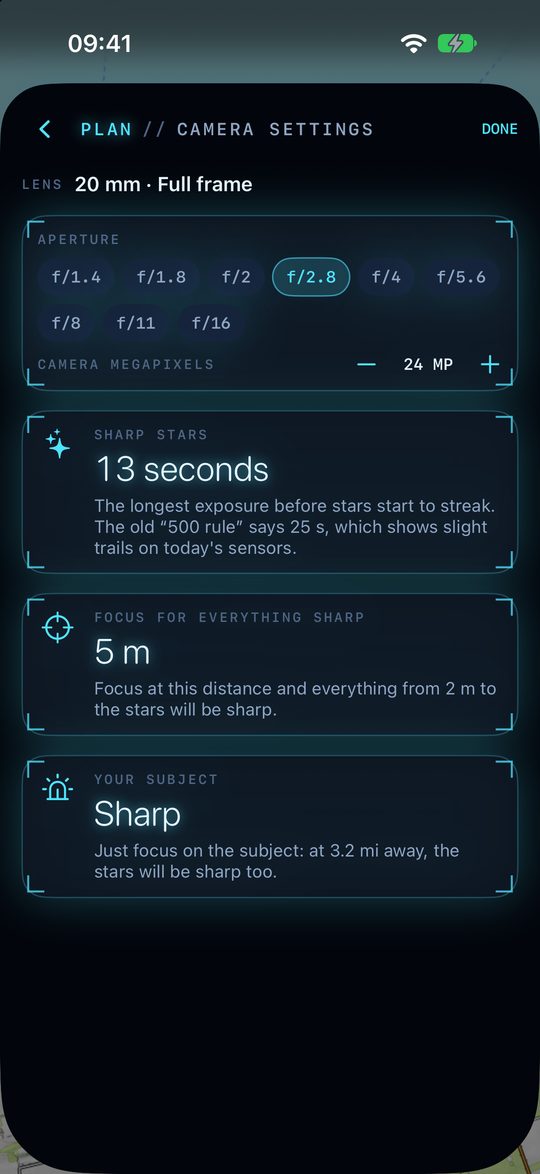
The longest exposure before stars blur (the NPF rule), where to focus, and whether the subject is sharp.
Whether it's sunlit or a silhouette, where the light comes from, and its shadow.
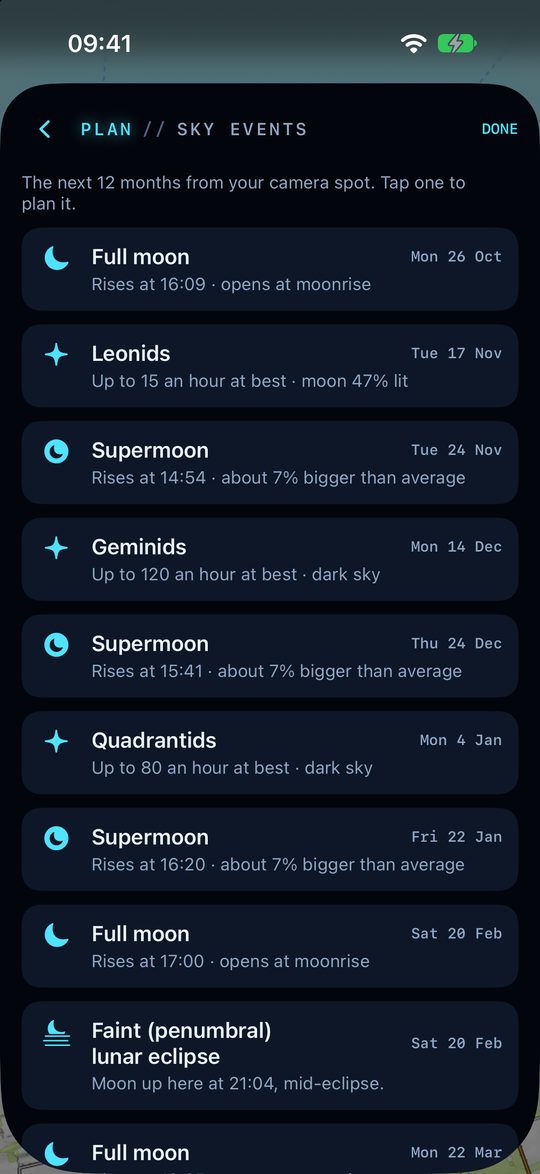
Full moons, supermoons, meteor peaks with the moonlight, and eclipses seen from your spot.
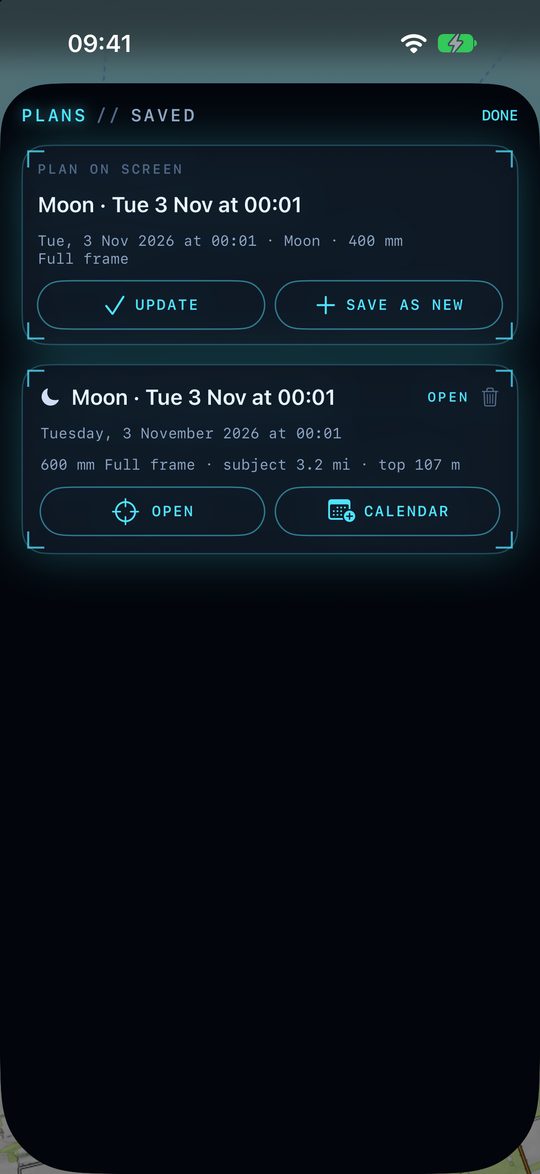
Pins, time and lens kept together. Add one to your Calendar with a reminder.
Seven days in 4-hour windows
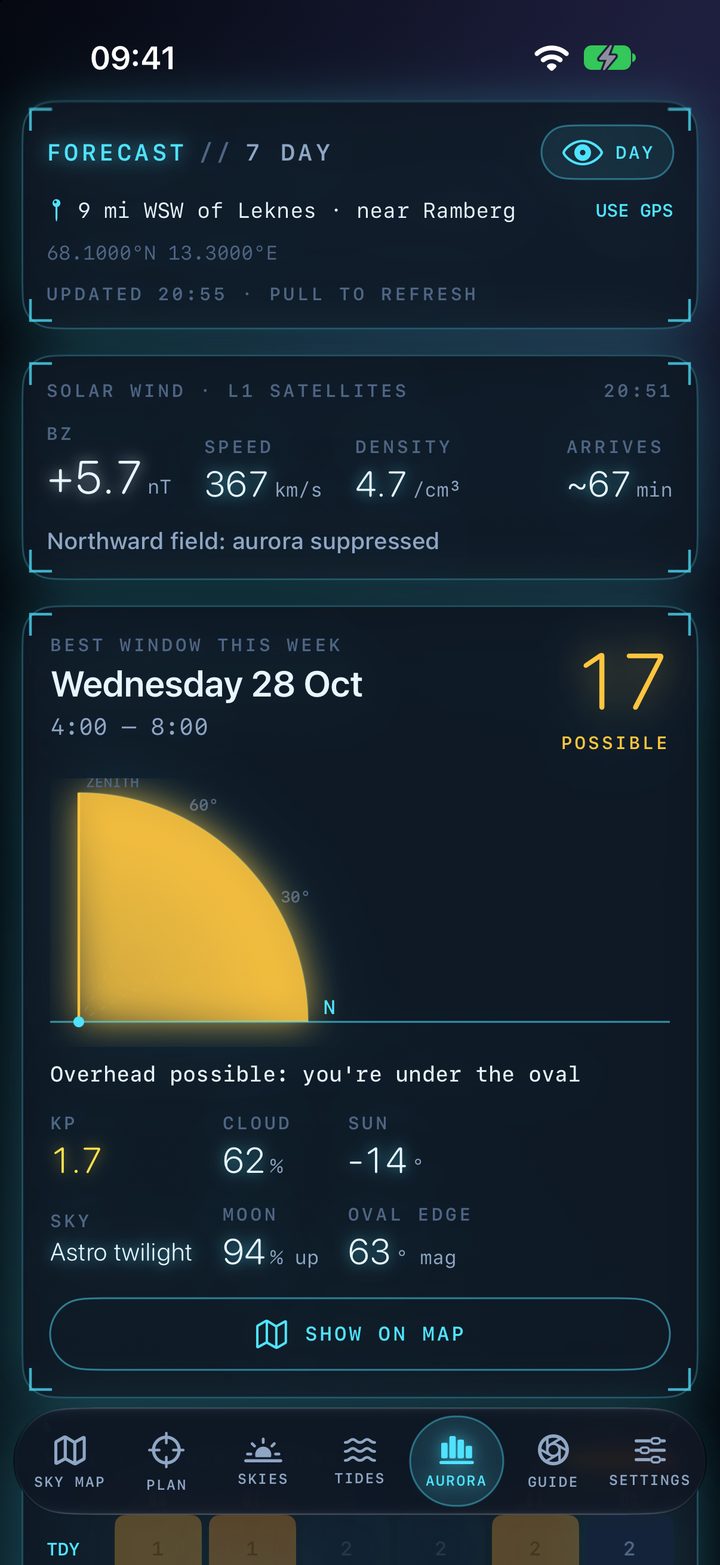
Kp alone doesn't say whether you'll see anything. SkyAura combines it with your magnetic latitude, darkness, cloud and moonlight into one score per window.
 1
2
3
4
5
6
7
1
2
3
4
5
6
7
- 1Forecast location
Your pin or GPS spot, its coordinates and when the data last updated. Pull down to refresh.
- 2Solar wind at L1
Live from the satellites 1.5 million km sunward. A strongly negative Bz with fast wind means aurora is coming; "Arrives" counts down the minutes.
- 3Best window this week
The highest-scoring 4-hour window, out of 100. Tap any block in the week grid to inspect it instead.
- 4Sky gauge
How high above your northern horizon the aurora should reach. When you're under the oval it can be overhead.
- 5Conditions
Kp, cloud, sun angle, darkness, moon and the oval's edge in magnetic latitude.
- 6Show on map
Opens the Sky Map at that window's time.
- 7Week grid and Kp chart
Below the card: 7 days × 6 windows, then a Kp bar chart with dark hours shaded and cloud cover drawn as a dashed line.
Will the sunrise light up?
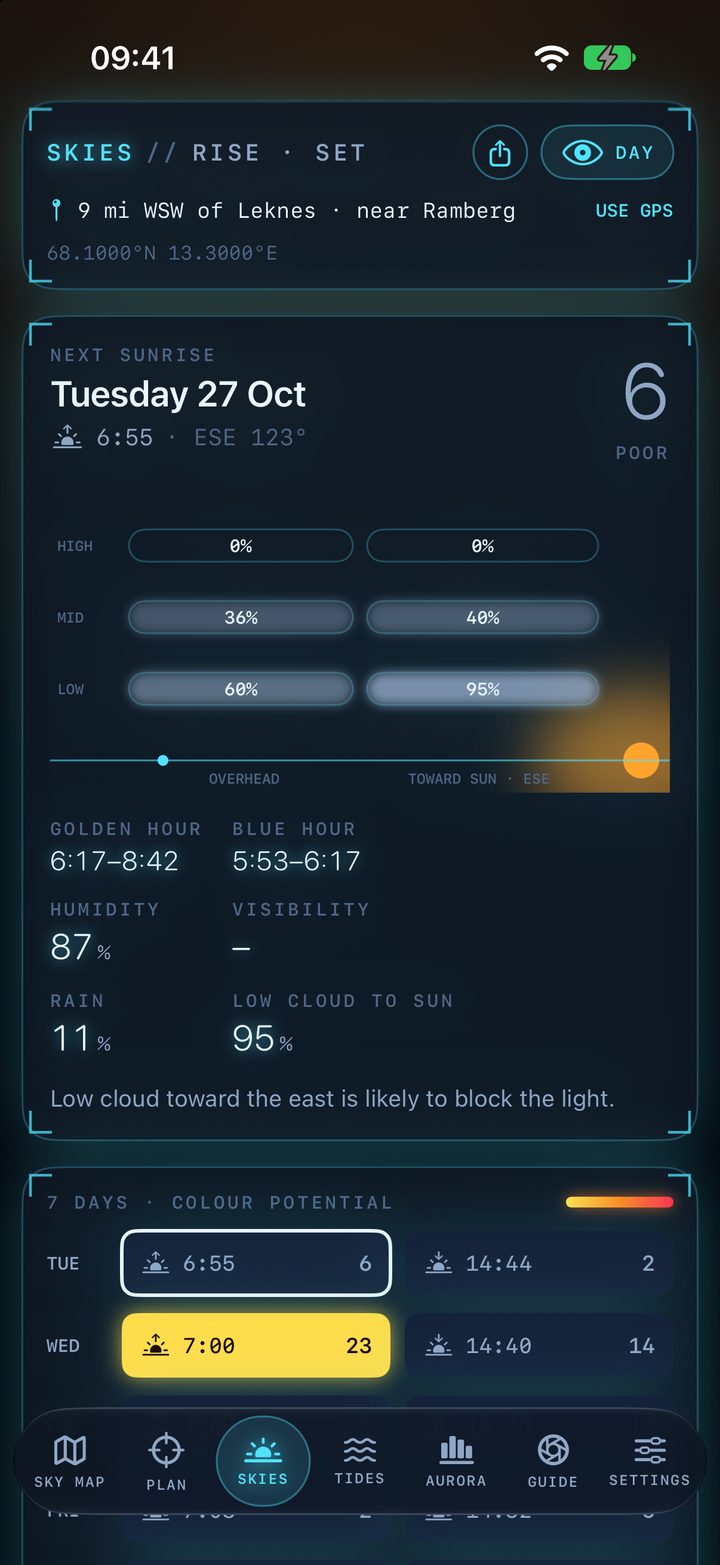
Colour needs a canvas of high or mid cloud overhead and a clear gap toward the sun for light to slip under it. SkyAura checks both, 60–150 km toward the sun.
 1
2
3
4
5
6
1
2
3
4
5
6
- 1Score and rating
0–100, rated Poor, Fair, Good or Great, with the time and compass direction of the sun.
- 2Cloud layers
Low, mid and high cloud overhead (left) and toward the sun (right). Low cloud toward the sun blocks the light.
- 3Golden and blue hour
Golden hour runs from the sun at 6° to −4°, blue hour from −4° to −6°.
- 4Conditions
Humidity, visibility, rain and the low cloud toward the sun, with a one-line explanation of the score.
- 5Seven days
Every sunrise and sunset coloured on the same yellow → red scale. Tap one to see it in full.
- 6Share
Sends a plain-text plan for the spot.
Inversions, ice, summit wind and the moon
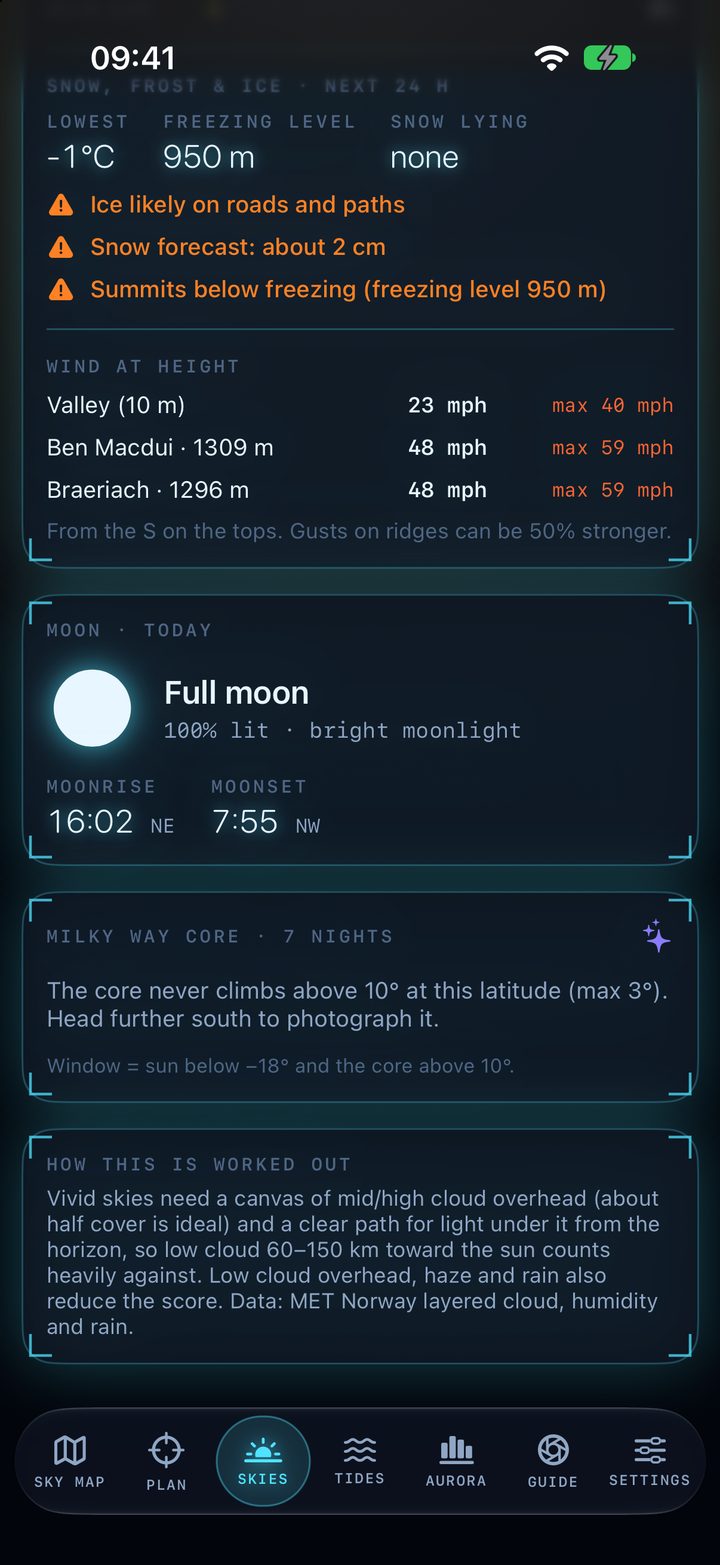
Further down the Skies tab. First the next three dawns, scored for mist, inversions and a sea of cloud, with how high to climb to look down on it. Then the hazards, the wind on the tops, the moon, and the Milky Way core.
 1
2
3
4
5
1
2
3
4
5
- 1Snow, frost & ice
Lowest temperature, freezing level and snow lying over the next 24 hours.
- 2Warnings
Ice on roads and paths, frost, snow forecast, and summits below the freezing level.
- 3Wind at height
Valley wind against the highest nearby peaks, now and the strongest in the next 12 hours. Red at gale strength on the tops.
- 4Moon today
Phase, how lit, how bright the moonlight, and moonrise and moonset with their directions.
- 5Milky Way core
The window each night when the sun is below −18° and the core is above 10°. Far north, it tells you when the core never gets high enough.
Tell me when my spots line up
Save the places you shoot from with the ☆. Each spot has four alerts you can switch on or off. Every alert is sent once per event.
- ✦Aurora
Aurora in that spot's sky and it isn't overcast.
- ☀Sun
A sunrise or sunset rated Great, up to 4 hours ahead.
- ≈Tide
Low tide within 90 minutes of sunrise or sunset.
- ☁Mist
Mist or a cloud inversion likely at the next dawn, sent from 3 pm the day before.
Send a friend the spot and the time
The share button beside a pin, or on the Skies tab, sends a plain-text plan to Messages, WhatsApp or email. Drag the map time first to plan a later night.
SkyAura plan: 5 mi ESE of Aviemore
57.1700°N 3.7000°W · NH 973 100
Map: https://maps.apple.com/?ll=57.17000,-3.70000

Aurora: Possible (20:00–00:00, Kp 4.3, cloud 22%)
Sunset 18:05 WSW: Great (69/100)
Now: 7°C mainly clear, wind 6 mph SW, cloud 15%
Dawn Sat: valley mist likely (mist 62%, inversion 30%)
Wind on Ben Macdui (1309 m): 32 mph
Watch for: frost
Next low tide 07:40
↑ an example plan, as it arrives in Messages
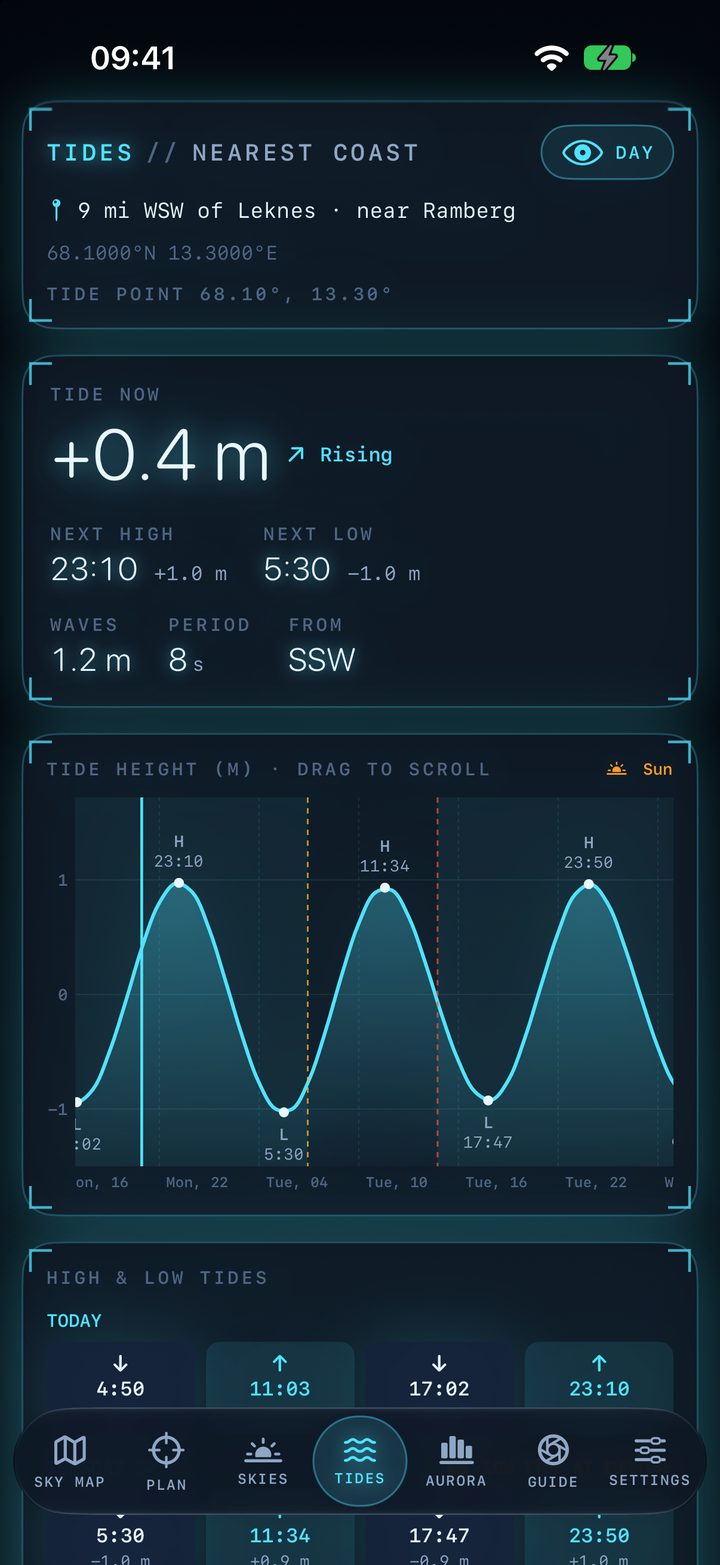
The nearest coast, worked out for you
 1
2
3
4
5
6
1
2
3
4
5
6
- 1Tide point
The nearest sea within about 160 km, how far away and in which direction.
- 2Tide now
Height relative to mean sea level, and whether it's rising or falling.
- 3Next high and low
Times and heights.
- 4Waves
Height, period and the direction they're coming from.
- 5Tide chart
Drag through the week. Highs and lows are marked, night is shaded, and sunrise and sunset are dashed lines.
- 6High and low tides
Day by day. A camera badge marks low water within 90 minutes of sunrise or sunset: exposed rocks, pools and reflections.
Modelled tides, not a harbour table: times can differ by tens of minutes. Not for navigation.
Camera settings for tonight's sky
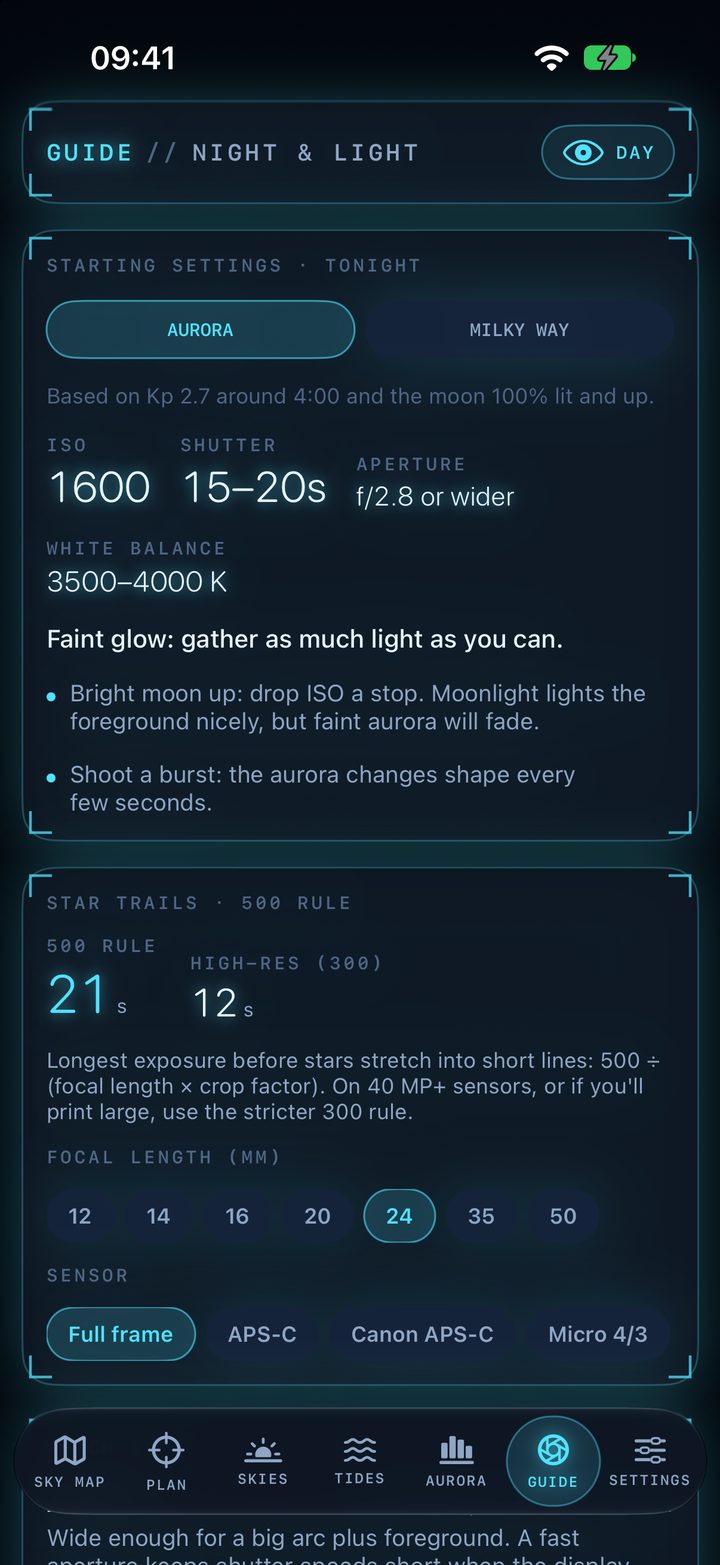
Starting points worked out from the forecast, not a generic cheat sheet. Adjust after your first frame and check the histogram.
 1
2
3
4
5
1
2
3
4
5
- 1Aurora or Milky Way
Switch subject. Settings use tonight's best aurora window and the moon at that time.
- 2ISO, shutter, aperture, white balance
Faint aurora: ISO 3200, 15–20 s. Active (Kp 5–7): ISO 1600, 4–8 s to keep rays sharp. A bright moon drops ISO a stop. Milky Way: widest aperture, ISO 3200–6400, as long as the 500 rule allows.
- 3Notes for tonight
Moonlight on the foreground, when to shoot a burst, the Milky Way core's window, and stacking tips.
- 4Star-trail limit
500 ÷ (focal length × crop factor) gives the longest exposure before stars stretch. The 300 rule is stricter, for 40 MP+ sensors or big prints.
- 5Your lens and sensor
Pick 12–50 mm and full frame, APS-C, Canon APS-C or Micro 4/3. Remembered for next time.
Which lens for aurora, Milky Way, moonrise, sunsets, mist and coast. Field tips: focusing on a star, RAW, stabilisation off on a tripod, long-exposure noise reduction off, lens dew, cold batteries, red light, and arriving in daylight.
More map on a bigger screen
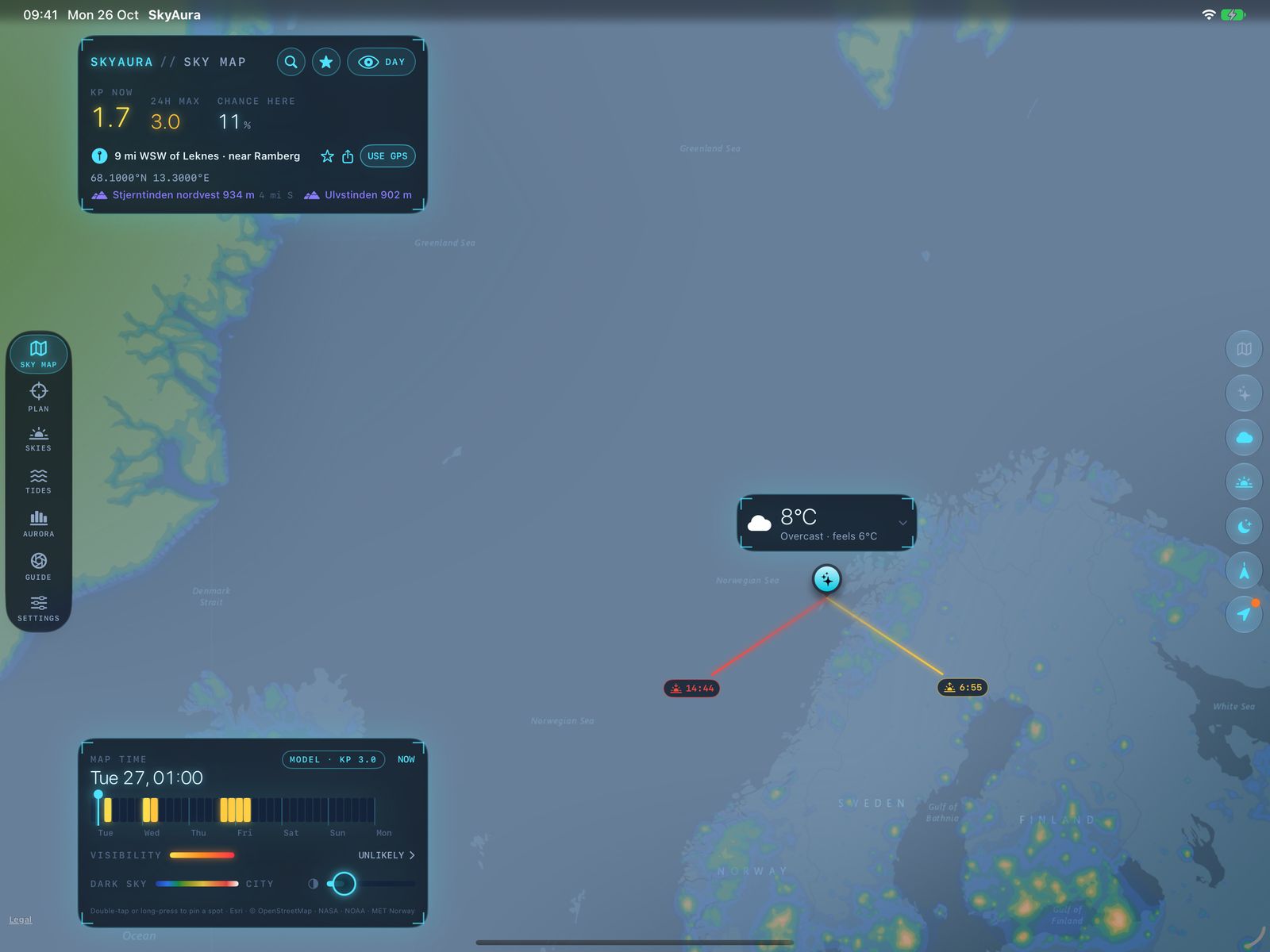
On iPad, and on iPhone turned sideways, the map runs edge to edge. Tabs become a rail, panels sit on the left, buttons down the right, and the pin glides to the middle of the open map.
 1
2
3
4
5
6
1
2
3
4
5
6
- 1Tab rail
The tab bar moves to the left edge.
- 2Header
Kp, chance here and the pinned place.
- 3Weather card
Rides above the pin.
- 4Pin
In the middle of the open map.
- 5Layer buttons
Centred down the right edge.
- 6Map time & dark sky
The week, and the dark sky opacity slider.
Red, so your eyes stay dark-adapted
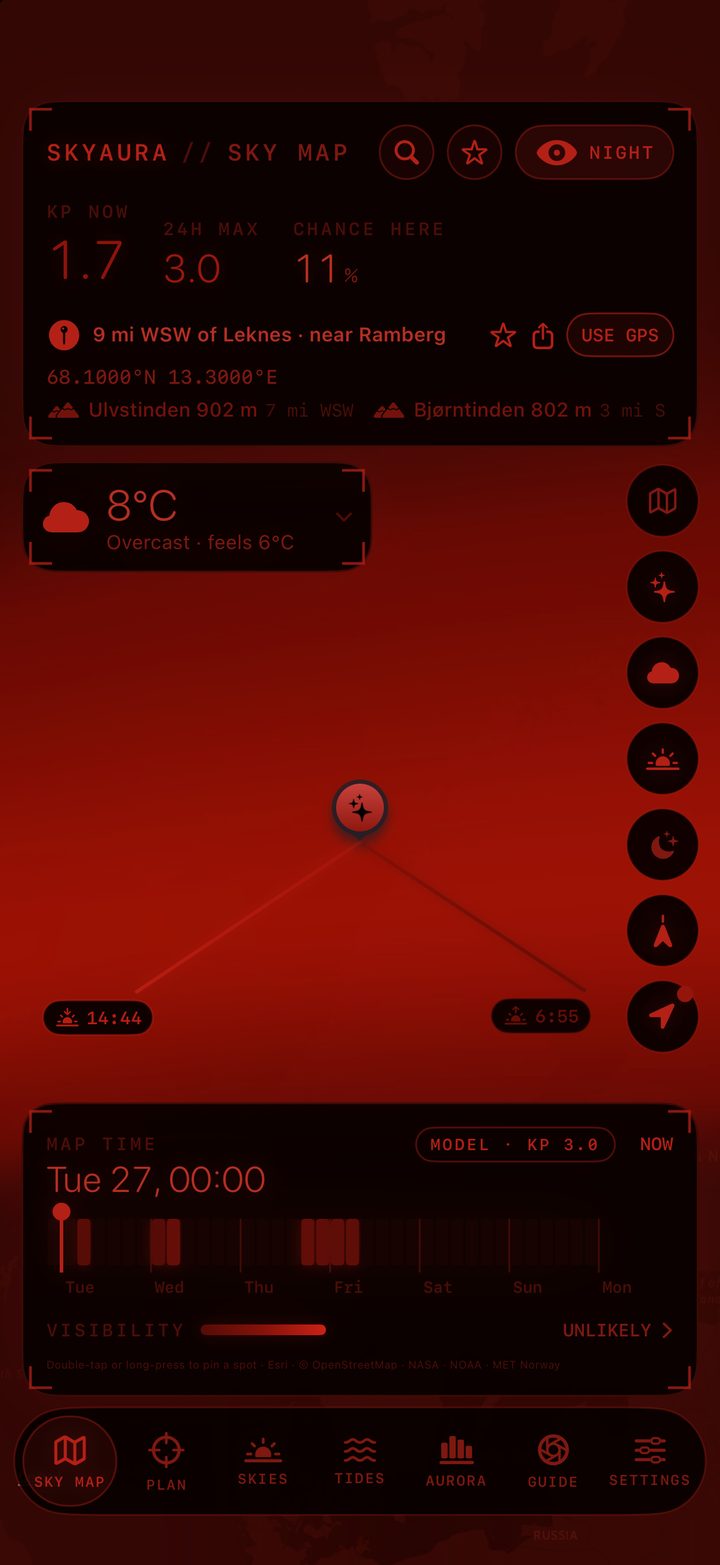
White light resets your night vision for up to half an hour. Night mode recolours everything, including the map, the Plan sky view and the Milky Way, and hides the status bar.
 1
2
3
1
2
3
- 1One tap
The Night button, on every tab, or in Settings. Settings adds an extra dimming slider.
- 2The map turns red too
Every base map and layer. At night the aurora draws above the clouds as the brightest layer, so it never disappears into the red.
- 3No white leaks
Your location dot, peak labels, sliders and switches are all redrawn in red. For the keyboard and other apps, Settings explains the iOS red colour filter.
Settings has Standard, Large and Larger text sizes, and your units for temperature, wind, distance and heights.
Quick reference
| Gesture | Where | What happens |
|---|---|---|
| Double-tap | Sky Map | Drop the pin there. All forecasts update. |
| Long-press | Sky Map | Drop the pin there. |
| Press & drag | Pin | Move the pin. |
| Double-tap | Pin | Bring back a hidden weather card. |
| Drag | Weather card | Move the card anywhere. |
| Tap / double-tap | Weather card | Fold to the temperature / hide. |
| Tap / double-tap | Locate button | Centre on the forecast spot / clear the pin and use GPS. |
| Drag | Map time strip | Move the map through the week. |
| Long-press | Plan map | Place the camera or subject pin, whichever is selected. |
| Drag | Plan day curve | Scrub through the day. |
| Drag | View along the line | Tilt and pan your frame. |
| Double-tap | View along the line | Full screen, and back. |
| Double-tap | Plan panel | Fold it down for more map. |
| Tap | Stand here pin | Move camera here. |
| Tap ☆ | Header / pinned place | Open saved spots / save this spot. |
| Tap share | Pinned place, Skies | Send a plan for the spot and the time on the scrubber. |
| Pull down | Aurora, Skies, Tides | Refresh. |
Forecasts on your Home Screen
Three widgets, each in small and medium sizes, plus two for the Lock Screen. Tap any widget to open SkyAura on the matching tab.
Illustrations of each widget's layout with example values. On your phone they show your own live forecasts.
Widgets use your phone's GPS, not a pin you've dropped in the app. Without location access they fall back to Tromsø.
Widgets use automatic units for your region and the day theme. Sharing your app settings with widgets needs a paid Apple developer account.
iOS decides exactly when widgets refresh, within the timings above. Opening SkyAura doesn't force a widget update.
Notifications
"Aurora visible now" from NOAA's nowcast, and "Aurora incoming" when the solar wind turns strongly southward, 30–60 minutes before it arrives. Settings → Aurora alerts.
Aurora, Great sunrise or sunset, low tide at golden hour, and dawn mist or inversions for each saved spot. Switch them on in ☆ Saved spots.
With SkyAura open, checks run every few minutes. When it's closed, iOS decides how often, from about 15 minutes to a few hours, so keep the app open on a night out.
Where the numbers come from
All free sources. Sun and moon positions are calculated on the phone, to about 0.01°. Forecasts are saved on the phone and reused until they expire, so the app works with little signal and keeps showing the last forecast offline.